Subscription & Billing
Plans, usage limits, overages, and payment history.
Your subscription and billing details live under your avatar menu, just click your avatar in the top right and choose Subscription.
What you'll see on this page
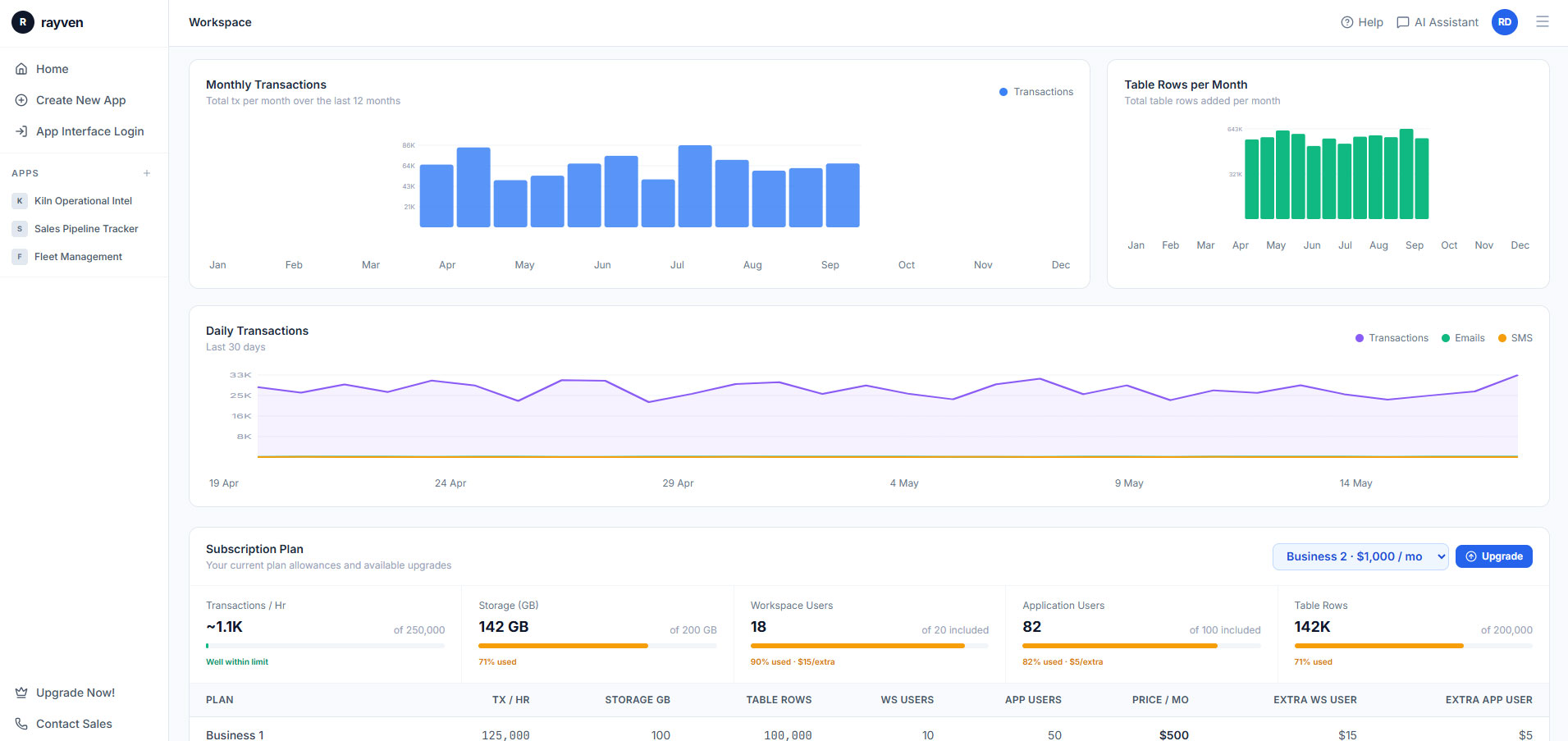
The Subscription page gives you a quick snapshot of where things stand: your Total Paid Year-to-Date, your current plan, your next billing date, and the payment method on file.
Plans and usage limits
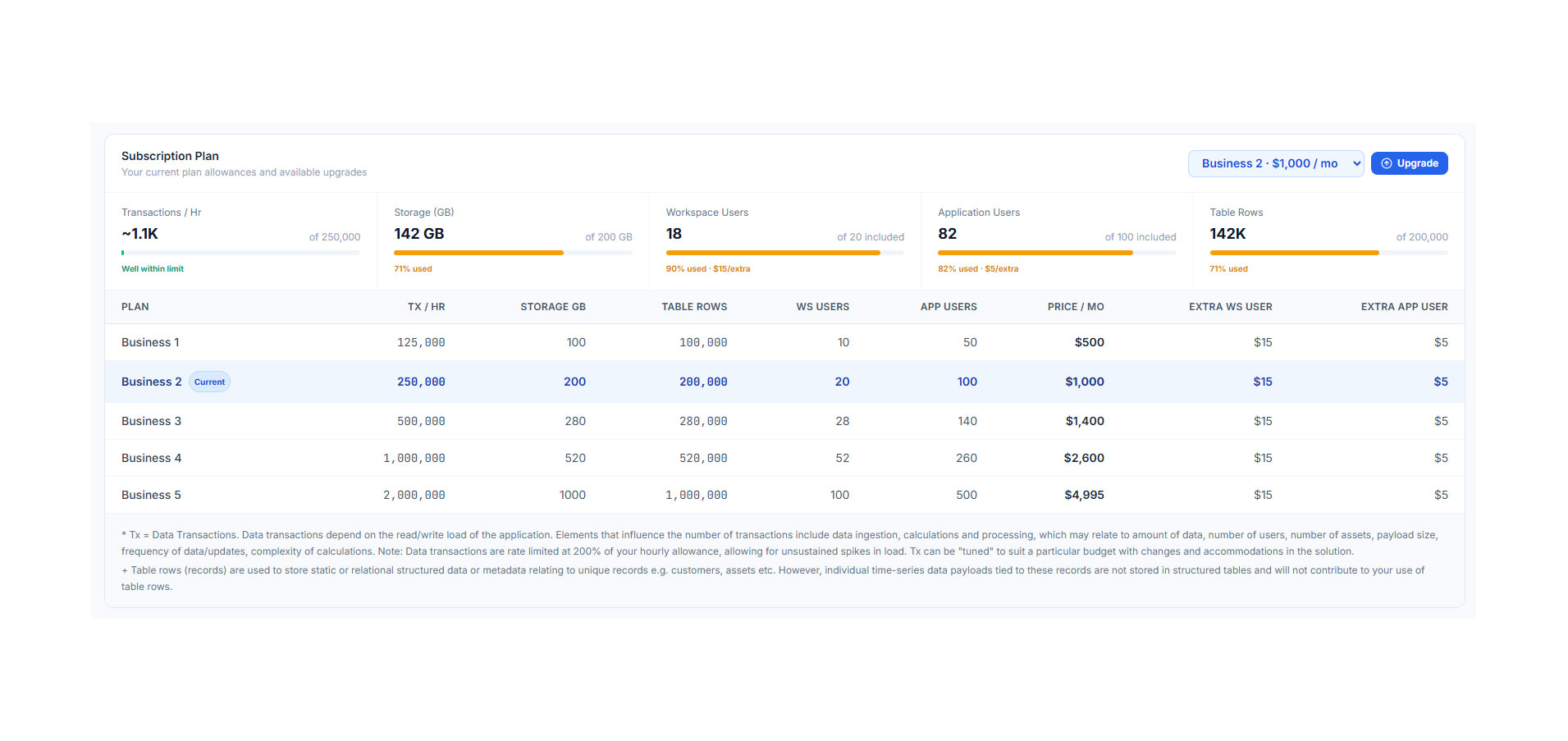
Rayven offers five Business plans (Business 1 through Business 5, ranging from $500 to $4,995/mo). Each plan comes with its own allowances for:
- Transactions per hour
- Storage (GB)
- Table Rows
- Workspace User seats
- Application User seats
Usage bars on the page show how close you're tracking to each of these limits, color-coded green, amber, or red so you can tell at a glance whether you're comfortably under, approaching, or right up against a limit.
Going over a limit doesn't cut you off. Extra Workspace User and Application User seats are simply billed as overage (around $15 per extra Workspace User and $5 per extra Application User) rather than blocking usage outright.
Transactions vs. Table Rows
| Term | What it means |
|---|---|
| Transactions (Tx) | Data read/write operations, metered per hour. Your rate allows short bursts up to 200% of your hourly allowance, so brief spikes won't cause problems. |
| Table Rows | Records stored in your structured Tables. Time-series data isn't counted toward this limit. |
Upgrading your plan
If you need more room, pick a higher plan from the dropdown on the Subscription page and confirm your choice.
Payment history
A payment history table lists each month's plan, transactions, table rows, active users, storage, and emails/SMS sent, along with the invoice amount and status (Current or Paid). You can download a PDF of any individual invoice, or export the entire history as a CSV.
If you're near a usage limit
Head to Service Usage first to see which app or metric is driving your usage, then check the Subscription page to compare that against your current plan limits and see your upgrade options. Remember, overages for Workspace Users and Application Users are billed per extra seat rather than blocking you outright, while Storage, Transactions, and Table Rows are shown as a percentage of your limit with the same green/amber/red status color.
This page covers general plan and usage questions. For anything more specific to your account, like disputing a charge or requesting a refund, please reach out to human support directly rather than relying on an AI assistant, so a real person can look into the details with you.
Frequently Asked Questions
What happens if I go over my plan's limit?
It depends on the metric. Going over on Workspace User or Application User seats just adds an overage charge (around $15 per extra Workspace User, $5 per extra Application User), it doesn't block anything. Storage, Transactions, and Table Rows are shown as a percentage of your limit with a green/amber/red status, so check Service Usage if you're unsure what's driving the number.
Do Transactions include Table Rows, or are they separate limits?
They're separate. Transactions (Tx) count data read/write operations metered per hour, while Table Rows count records stored in your Tables. You can be well under one limit and close to the other.
Does time-series data count against my Table Rows limit?
No. Time-series data isn't counted toward Table Rows, so high-frequency sensor or event data won't push you toward that particular limit.
Can I downgrade my plan, not just upgrade?
The Subscription page's plan dropdown is where you change tiers in either direction. If you're not sure a lower plan still covers your usage, check Service Usage first to compare your actual consumption against the lower plan's limits.
Where do I find old invoices?
The payment history table on the Subscription page lists every month's plan, usage, invoice amount, and status. Download any individual invoice as a PDF, or export the full history as a CSV.
Where do I manage Workspace User or Application User seats directly?
Use Workspace Users & Roles to manage builder seats, or Application Users to manage end-user seats across all your apps. This page just shows the usage and overage cost.
Does Cassandra-backed Workflow data affect any of my plan's limits?
Not Table Rows, that limit only counts rows in a Table (MySQL). It does count toward your overall Storage allowance, though. See Core Concepts for how the two databases differ, and Service Usage for the breakdown.
Where do I see a history of email and SMS sent, not just the cost?
Check the Email & SMS Log for a full audit trail of every message sent, separate from the cost summary on this page.
Where do I check security and compliance details before upgrading?
See Security & Compliance for encryption, infrastructure, and ISO 27001 certification details that apply across every plan.
Related articles
To dig deeper into what's driving your usage before it becomes a limit, take a look at: